






- Choosing a selection results in a full page refresh.
Couldn't load pickup availability
Free Shipping
You may request a return within 30 days of delivery, subject to our return policy. For returns due to a change of mind or other customer-related reasons, return shipping costs are the customer's responsibility. If your item arrives damaged, defective, or incorrect, please contact our support team for assistance. All returns must be approved before the item is shipped back. Please contact our customer service team to start a return request.For complete terms and conditions, please review our Refund Policy.
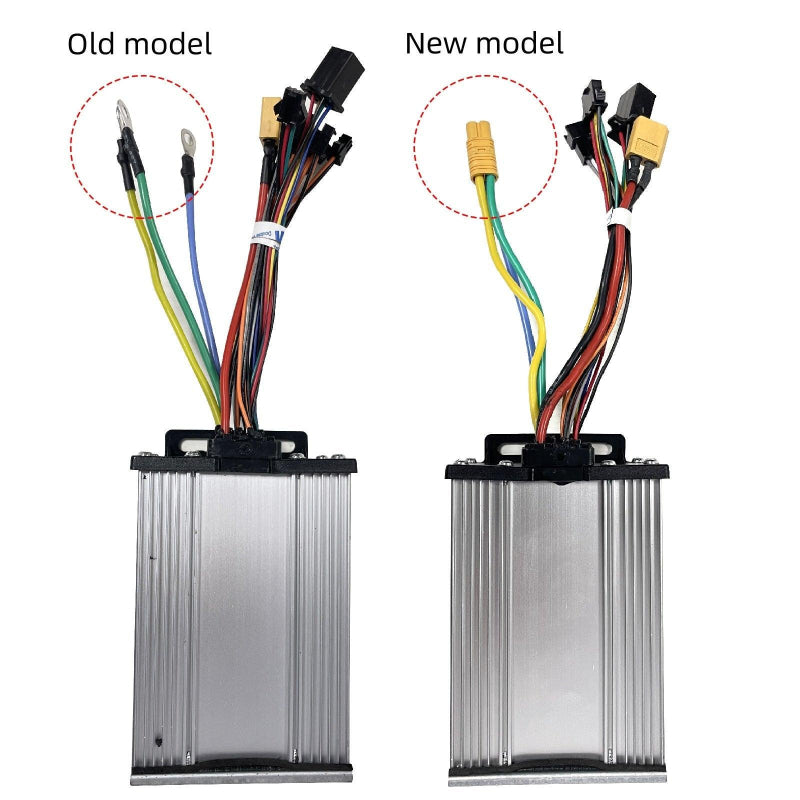
Arwibon Q30 controllers are divided into old and new models, Please check carefully to confirm which controller you need before purchasing.
Please confirm before purchasing.
Arwibon Q30 controllers are available in old and new models, Please check carefully to confirm which controller you need before purchasing.
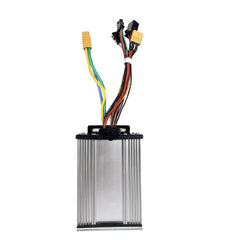
The Arwibon Q30 Electric Scooter Controller is a replacement main controller for the Arwibon Q30 scooter. It manages battery power, rear motor operation, throttle input, Hall sensor signals, brake cutoff, and other control functions connected through the scooter’s main wiring harness.
Arwibon Q30 controllers are available in different wiring versions. Older and newer production batches may use different connector arrangements, so please compare your original controller and plugs carefully before ordering.
If you are not sure which version you need, send us clear photos of the original controller, label, and connectors before purchasing.
Arwibon Q30 scooters may use different controller versions depending on production batch.
Before purchasing, compare:
Do not purchase based only on the controller housing appearance.
If your original connectors are different from the product photos, contact us before ordering.
Controller replacement may be needed when the Arwibon Q30 has symptoms such as:
Before replacing the controller, it is also worth checking the battery, motor phase wiring, Hall connector, throttle wiring, and brake cutoff circuit.
| Connection | Connector | Connected Component |
|---|---|---|
| 1 | Yellow 3-pin MT60 connector | Rear motor phase wires |
| 2 | White 6-pin connector | Rear motor Hall sensor |
| 3 | Black 3-pin connector | Control signal harness |
| 4 | Wide black multi-pin connector | Main handlebar/control harness |
| Auxiliary | Two small black 2-pin connectors | Deck side LED wiring |
| 5 | Yellow XT60 connector | Main battery power |
The exact connector arrangement can vary between controller versions. Always compare the replacement controller with the original before connecting power.
Remove all 12 bolts around the pedal cover.
Carefully pry the rear edge of the cover upward and lift it away from the deck.
Disconnect the two small black 2-pin LED connectors attached to the pedal cover.
Locate the yellow XT60 connector between the battery and controller.
Disconnect the XT60 plug before touching the controller signal or motor connectors.
The battery should remain disconnected throughout controller replacement.
Lift the controller enough to access the wiring.
Disconnect the black multi-pin control connector and the black 3-pin connector by pressing their locking tabs and pulling on the plastic housings.
Locate the yellow 3-pin MT60 connector.
Separate the motor-side and controller-side plugs.
Do not pull directly on the wires.
Locate the white 6-pin Hall sensor connector.
Press the locking tab and unplug it.
Once all wiring has been disconnected, lift the controller out of the deck.
Keep the old controller nearby so you can compare every connector with the replacement.
Connect the yellow 3-pin MT60 plug from the new controller to the rear motor connector.
Align the keyed shape before pushing the connector together.
Connect the white 6-pin Hall sensor plug.
Push it fully into position and check that none of the small terminals has moved backward inside the housing.
Reconnect the black 3-pin control connector and the wider multi-pin main harness connector.
Match each plug by connector shape, pin count, locking position, and original wiring layout.
Do not force similar-looking connectors together.
Bring the pedal cover close to the deck and reconnect the two small 2-pin LED plugs.
Do not let the cover hang from the wiring.
Check all motor and signal connectors again.
Only after the other wiring is complete should the yellow XT60 battery plug be reconnected.
Place the controller back into its original position inside the deck.
Arrange the wiring around the battery and controller so that:
Before installing all 12 cover bolts, power on the scooter and perform a basic functional test.
Check:
For the motor test, keep the driven wheel off the ground and apply only a small amount of throttle.
If the motor shakes or does not start correctly, turn the scooter off and recheck the yellow motor connector and white Hall sensor plug.
Arrange all wiring below the cover.
Position the pedal cover and start all 12 bolts before fully tightening them.
If the cover does not sit flat, remove it and check for trapped wiring rather than using the bolts to force the cover down.
During removal, disconnect the yellow XT60 battery connector before unplugging the controller wiring.
During installation, connect the XT60 plug only after the motor, Hall sensor, control harness, and light wiring are complete.
Old and new Arwibon Q30 controller versions may not use exactly the same wiring arrangement.
Do not assume that two controllers are interchangeable because the aluminum housings look similar.
Before reconnecting the battery, inspect every plug for:
A wire caught between the metal cover and deck can damage the insulation and cause an electrical fault.
Please compare the controller and connector configuration with your original part before ordering.
Exact fit replacement controller. Clear photos helped me tell old and new versions apart. All functions including lights and brake cutoff work properly. If your scooter loses power or acts erratically, this is a reliable fix.
My old controller died completely. This new‑model swap brought my Q30 back to life. Acceleration feels natural, no jerky surges. Handles regular daily commuting without overheating issues. Very satisfied with this purchase.
Well‑built aluminum housing helps with heat dissipation. All wire harnesses are neatly terminated. Important to verify your original connector type before ordering. Once correctly fitted, every feature works as expected. Great OEM replacement part.
Solid quality controller. Make sure you pick either old or new model to match your original unit. Installation was straightforward. No weird cuts or power drops during riding. Fixed the no‑power issue my scooter had.
Got the new‑model controller for my Arwibon Q30. All plugs lined up perfectly after I double‑checked the connector style. Throttle response is smooth, power delivery is steady. My scooter is back to full performance after installing this replacement unit.
Thanks for subscribing!
This email has been registered!

| Product | SKU | Description | Collection | Availability | Product Type | Other Details |
|---|